


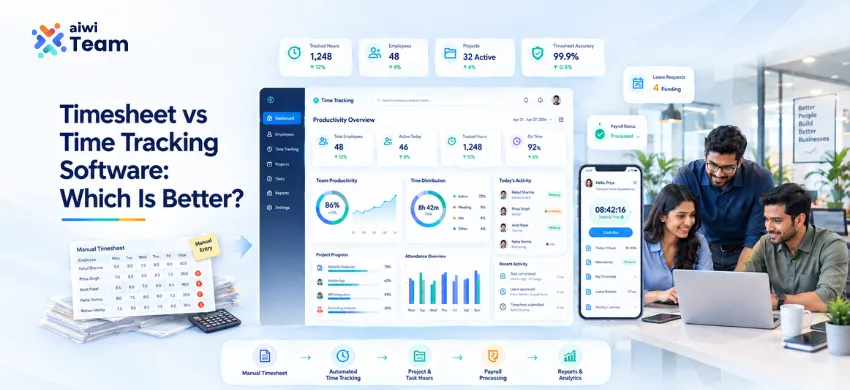
When comparing timesheet vs time tracking software, businesses need to look beyond simply recording employee working hours. The right solution can affect payroll accuracy, employee productivity, project profitability, attendance management, client billing, and overall workforce visibility.
A traditional timesheet is primarily a record of hours worked, usually entered manually by employees at the end of a day or week. Time tracking software, on the other hand, can automate time collection and connect employee hours with projects, tasks, attendance, payroll, and reporting.
For small teams with simple workflows, manual timesheets may be enough. But as businesses grow, an employee time tracking system can reduce manual data entry, improve accuracy, and provide real-time visibility into how work hours are being used.
In this guide, we’ll compare timesheet vs time tracking, explore manual vs automated timesheets, and explain which option makes more sense for your business.
Timesheet vs Time Tracking Software: Quick Comparison
| Factor | Traditional Timesheet | Time Tracking Software |
|---|---|---|
| Time entry | Usually manual | Automated or digital |
| Accuracy | Depends on employee input | Higher with automated tracking |
| Real-time visibility | Limited | Available in real time |
| Project tracking | Basic | Detailed project and task tracking |
| Payroll integration | Often manual | Can be integrated |
| Attendance management | Separate process in many cases | Can be connected |
| Reporting | Spreadsheet/manual reports | Automated reports and dashboards |
| Employee productivity | Limited visibility | Better visibility into work patterns |
| Scalability | Difficult with larger teams | Designed for growing teams |
| Data entry | High | Low |
| Error risk | Higher | Lower |
| Management effort | High | Lower |
The simplest way to understand the difference is this:
A timesheet records time. Time tracking software helps businesses capture, organize, analyze, and use that time data.
What Is a Timesheet?
A timesheet is a record of the amount of time an employee spends working.
Traditionally, employees enter their working hours into paper forms, spreadsheets, or digital documents. A typical timesheet may include:
- Employee name
- Date
- Start time
- End time
- Break duration
- Total hours worked
- Project or task
- Overtime
- Notes or descriptions
For example, an employee might enter:
| Date | Project | Hours |
|---|---|---|
| Monday | Website Development | 7.5 |
| Tuesday | Website Development | 8 |
| Wednesday | Client Support | 7 |
| Thursday | Website Development | 8 |
| Friday | Reporting | 7.5 |
At the end of the week, a manager or HR team reviews the timesheet.
This approach can work when the organization is small and work processes are simple. However, manual timesheets become increasingly difficult to manage as employee numbers, projects, locations, and payroll requirements increase.
What Is Time Tracking Software?
Time tracking software is a digital system that helps businesses record and manage employee working time.
Depending on the platform, employees may be able to clock in and out, start and stop timers, assign time to projects and tasks, record breaks, and submit timesheets digitally.
Managers can then use the collected information to understand:
- How much time employees are working
- Where employees are spending their time
- How much time projects require
- Which tasks consume the most resources
- Whether projects are staying within estimated hours
- How much billable time has been recorded
- Whether overtime is increasing
- How time data affects payroll and attendance
For businesses looking for centralized time tracking software for businesses, the major advantage is that time data can become part of a broader workforce-management workflow rather than remaining inside an isolated spreadsheet.
For example, AIWI Team's Time Tracking Software can help organizations manage employee work time digitally while connecting time information with broader workforce operations.
Timesheet vs Time Tracking: What Is the Real Difference?
The biggest difference between timesheet vs time tracking is how time information is captured and what businesses can do with that information afterward.
A traditional timesheet is primarily a record-keeping tool.
Time tracking software is a workforce data and management system.
1. Manual Data Entry vs Automated Tracking
With a traditional timesheet, employees are generally responsible for entering their own hours.
This creates several possibilities for errors:
- Forgotten entries
- Incorrect working hours
- Incorrect project allocation
- Duplicate entries
- Delayed submissions
- Incorrect overtime calculations
Automated time tracking reduces the amount of information employees have to enter manually.
Depending on the software configuration, time may be captured through digital clock-in/clock-out, timers, attendance records, or other automated mechanisms.
This makes manual vs automated timesheets an important consideration for growing organizations.
2. Historical Records vs Real-Time Visibility
A spreadsheet-based timesheet often tells managers what employees reported after the work happened.
Time tracking software can provide much faster visibility.
Managers may be able to see current attendance, tracked hours, project time, overtime, and other workforce information from a centralized dashboard.
This is particularly useful for distributed, remote, hybrid, and field teams.
3. Basic Time Records vs Detailed Workforce Data
A timesheet may tell you that an employee worked eight hours.
Modern time tracking software can provide additional context.
For example:
Employee A worked 8 hours today, including 5 hours on Project X, 2 hours on Project Y, and 1 hour on administrative tasks.
That additional information can help managers understand resource allocation and project performance.
Manual vs Automated Timesheets
The choice between manual and automated timesheets depends largely on the complexity of your workforce.
Manual Timesheets
Manual timesheets can be useful for:
- Very small teams
- Simple work schedules
- Businesses with few projects
- Organizations with minimal reporting requirements
- Temporary or occasional time recording
Their biggest advantage is simplicity.
A basic spreadsheet can be created quickly without implementing new software.
However, manual processes often require more administrative work as the organization grows.
Automated Timesheets
Automated timesheet software is better suited to organizations that need consistent, scalable time data.
Common capabilities may include:
- Digital time entries
- Employee clock-in and clock-out
- Project-based time tracking
- Task-based tracking
- Automated calculations
- Approval workflows
- Attendance integration
- Payroll-ready data
- Reporting dashboards
- Overtime tracking
- Real-time visibility
The goal is not simply to eliminate spreadsheets. The larger objective is to create a more reliable source of workforce time data.
Which Is More Accurate: Timesheets or Time Tracking Software?
Generally, automated time tracking software can provide more consistent time data than manually maintained timesheets because it reduces the amount of information employees and managers need to enter manually.
Manual timesheets depend heavily on employee memory and discipline.
For example, an employee may work on a project from 10:00 AM to 12:00 PM but forget to record it until Friday. By then, the employee may have to estimate the exact amount of time spent.
Automated systems can reduce this dependency.
However, software does not automatically guarantee perfect data. Businesses still need:
- Clear tracking policies
- Correct employee configuration
- Appropriate permissions
- Accurate project setup
- Regular review of reports
The best results come from combining reliable software with well-defined workforce processes.
Time Tracking Software vs Timesheets for Payroll
Payroll is one of the biggest areas where accurate time information matters.
Traditional timesheets often require HR or payroll teams to manually collect, verify, calculate, and transfer information.
This can become challenging when the organization has:
- Multiple departments
- Different shifts
- Overtime
- Leave
- Attendance variations
- Remote employees
- Hourly workers
- Multiple locations
A digital system can reduce manual work by centralizing employee time and attendance information.
AIWI Team's Payroll Management Software can be connected conceptually with time and attendance workflows so that businesses can create a more structured payroll process.
For organizations that still rely heavily on spreadsheets, this can also be an opportunity to reduce repetitive payroll administration.
Time Tracking Software vs Timesheets for Project Management
Project-based organizations need more than total employee hours.
They need to understand where those hours were spent.
For example, an agency may have 100 total employee hours available during a week. A basic timesheet can show that 100 hours were worked.
But project-based tracking can reveal:
- 40 hours on Client A
- 25 hours on Client B
- 20 hours on internal work
- 15 hours on meetings and administration
This information can help managers evaluate project estimates and resource allocation.
Businesses can also connect time tracking with Project Management Software to create a more complete workflow between projects, employees, tasks, and tracked hours.
Time Tracking and Task Management
Projects are usually divided into smaller tasks.
For example:
Project: Website Redesign
Tasks:
- Research
- Wireframing
- UI design
- Development
- Testing
- Client revisions
A traditional timesheet may simply record eight hours under "Website Redesign."
A time tracking system integrated with Task Management Software can provide more granular information about how those eight hours were distributed.
This can help businesses identify recurring bottlenecks.
If testing repeatedly takes twice as long as expected, management can investigate why.
That information can improve future project estimates and resource planning.
Time Tracking Software for Attendance Management
Another important distinction is between tracking attendance and tracking work time.
Attendance answers questions such as:
Was the employee present?
Time tracking answers questions such as:
How much time did the employee work, and where was that time allocated?
Businesses often need both.
An Attendance Management System can help organizations manage attendance-related information, while time tracking can provide deeper information about working hours and project/task allocation.
When these processes are connected, HR and managers can work with more consistent workforce information.
Reporting: Where Time Tracking Software Has a Major Advantage
One of the strongest benefits of digital time tracking is reporting.
A spreadsheet can certainly generate reports, but someone usually has to organize the data first.
Time tracking software can automate many reporting processes.
Depending on the system, businesses may be able to generate reports for:
- Employee hours
- Project hours
- Task hours
- Overtime
- Attendance
- Productivity
- Billable hours
- Department performance
- Time allocation
- Payroll-related information
AIWI Team's Reporting Management System can be particularly relevant for businesses that need structured reporting across workforce operations.
The important point is that reporting should not simply show numbers.
Good reporting should help management answer business questions.
For example:
- Which projects consume more time than expected?
- Which departments are experiencing excessive overtime?
- How much employee capacity is available?
- Which tasks repeatedly take longer than planned?
- How much time is being spent on billable work?
These questions are much harder to answer efficiently using disconnected spreadsheets.
When Is a Traditional Timesheet Still Enough?
Not every business needs sophisticated time tracking software.
A traditional timesheet may be enough if:
- Your team is very small
- Employees work predictable schedules
- You have few projects
- Payroll is simple
- You do not need real-time reporting
- Managers can easily review submissions
- There are few attendance variations
For example, a five-person consulting business with straightforward schedules may not need a complex workforce-management system.
The important thing is to evaluate the operational cost rather than adopting software simply because it is available.
When Should a Business Switch to Automated Time Tracking?
Businesses should consider automated time tracking when manual processes begin creating operational problems.
Common warning signs include:
Employees Regularly Forget to Submit Timesheets
If HR constantly needs to remind employees to submit or correct timesheets, the process is consuming administrative resources.
Payroll Requires Repeated Manual Corrections
Frequent corrections can indicate that time and attendance information is fragmented or unreliable.
Managers Cannot See Current Workforce Information
If management has to wait until the end of the week or month to understand working hours, decision-making becomes slower.
Projects Frequently Exceed Estimated Hours
Without accurate project time data, it is difficult to understand why projects go over budget.
The Company Is Rapidly Growing
A spreadsheet process that works for 10 employees may become difficult to manage for 100 or 500 employees.
Teams Are Remote or Hybrid
Distributed teams often need better visibility into attendance, working hours, projects, and tasks.
For businesses experiencing these challenges, automated time tracking software can become an operational improvement rather than simply another HR tool.
How to Choose Employee Timesheet Software
If your organization is comparing employee timesheet software, don't evaluate products based only on the ability to record hours.
Consider the complete workflow.
1. Time Tracking Capabilities
Check whether employees can easily record working hours, breaks, overtime, and project time.
2. Attendance Integration
The system should work logically with your attendance process.
3. Project and Task Tracking
If your organization is project-driven, look for connections between employees, projects, tasks, and tracked time.
4. Payroll Compatibility
Check whether time and attendance data can support payroll processing.
5. Reporting
Look for customizable reports that help managers understand workforce and project performance.
6. Real-Time Visibility
Managers should be able to access current information without waiting for manual spreadsheet updates.
7. Scalability
Choose software that can support your expected team growth.
8. Ease of Use
A technically powerful system is not useful if employees find it difficult to use consistently.
9. Security and Permissions
Workforce data should be accessible according to appropriate roles and permissions.
10. Integration With Existing Workflows
The best system should fit into your existing HR, payroll, project, attendance, and workforce-management processes.
Timesheet vs Time Tracking Software: Which Is Better?
There is no universal answer for every organization.
If you only need a basic record of employee working hours, a traditional timesheet may be sufficient.
But if you need real-time visibility, automated data collection, project tracking, attendance integration, payroll support, reporting, and scalability, time tracking software is generally the stronger option.
The difference becomes particularly significant as teams grow.
A spreadsheet-based process can require more administration with every additional employee, project, location, and payroll rule.
Automated systems are designed to handle that complexity more efficiently.
Example: A Growing Digital Agency
Consider a digital agency with 50 employees.
The agency manages multiple client accounts and currently uses spreadsheets for weekly timesheets.
At the end of each week:
- Employees complete spreadsheets.
- Managers review submissions.
- HR checks attendance.
- Project managers compare hours with project estimates.
- Finance calculates billable hours.
- Payroll receives relevant employee data.
Every step creates opportunities for delays or errors.
With an integrated time tracking workflow, employees can record time digitally against projects and tasks.
Managers can review hours.
Project managers can compare actual time against estimates.
Finance can use approved time data for billing.
HR can use relevant information for workforce administration.
The value comes not from tracking time alone, but from connecting time data to business processes.
Why Businesses Are Moving From Timesheets to Automated Time Tracking
The transition from manual timesheets to automated systems is usually driven by three factors:
Accuracy.
Businesses need reliable information about employee hours, attendance, projects, and payroll.
Efficiency.
HR and managers want to spend less time collecting, correcting, and consolidating spreadsheets.
Visibility.
Management needs current workforce information to make better decisions.
This is particularly important for organizations operating remote, hybrid, field, project-based, or distributed teams.
AIWI Team also explores these broader workforce-management challenges in How Successful SEO Agencies Manage Time, Tasks, and Team Performance, which demonstrates why time, tasks, and team performance increasingly need to be managed together rather than through disconnected processes.
Final Verdict: Timesheet or Time Tracking Software?
A traditional timesheet may work for small teams with simple workflows, but growing businesses need more than manual hour records.
Time tracking software offers a more efficient way to capture employee hours, manage projects and tasks, connect attendance and payroll data, and generate actionable reports from one place.
If your business is still relying on spreadsheets, manual entries, or repeated follow-ups, switching to an automated employee time tracking system can improve accuracy, reduce administrative work, and give managers better visibility into how work hours are being used.
Ready to move beyond manual timesheets? Explore AIWI Team Time Tracking Software and see how it can simplify time tracking and workforce management.
